In today’s fast-paced world, managing tasks effectively is essential for staying productive and reducing stress. Whether it’s professional projects, school assignments, or personal errands, having a reliable system to keep track of tasks is crucial. While there are many premium task management solutions, several free tools to manage tasks provide powerful features to help you stay organized without spending a dime.
1. Trello – Visual Task Management for Projects
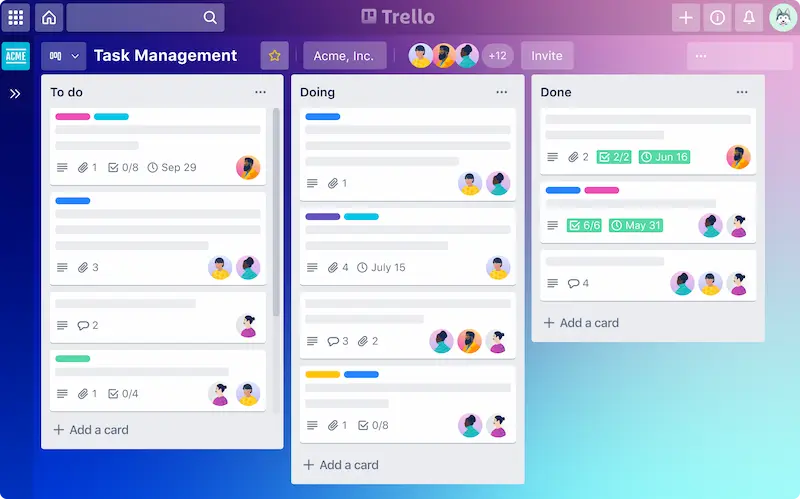
Trello is one of the most popular free tools to manage tasks, offering a visual approach with boards, lists, and cards to organize work. Each project can be represented as a board, while tasks are added as cards that move across lists such as “To Do,” “In Progress,” and “Completed.”
Key Features:
- Drag-and-drop interface for easy task management.
- Assign tasks to team members and set deadlines.
- Add attachments, comments, checklists, and labels for clarity.
- Integration with apps like Slack, Google Drive, and Dropbox.
Trello is ideal for both individuals and teams. Its visual nature makes it easy to track project progress, plan content calendars, or manage personal tasks efficiently.
2. Todoist – Simple and Powerful To-Do Lists
Todoist is another versatile option among free tools to manage tasks, focusing on productivity and organization. You can create tasks, set priorities, and organize them into projects or categories. Todoist also supports recurring tasks, making it perfect for habits or weekly routines.
Key Features:
- Create tasks with due dates and priority levels.
- Organize tasks with labels, projects, and filters.
- Track productivity with Karma points and daily goals.
- Collaborate with others by sharing tasks and projects.
Todoist is particularly useful for freelancers, students, and busy professionals who need a structured way to handle multiple tasks without feeling overwhelmed.
3. Microsoft To Do – Seamless Integration with Microsoft Ecosystem
Microsoft To Do is a simple yet powerful option among free tools to manage tasks. It integrates smoothly with Outlook and other Microsoft apps, allowing users to create task lists, set reminders, and add notes for each task.
Key Features:
- “My Day” feature highlights tasks you need to focus on daily.
- Recurring tasks and reminders ensure nothing is forgotten.
- Subtasks help break down larger projects into manageable steps.
- Synchronizes across devices with your Microsoft account.
This tool is excellent for professionals and students who use Microsoft 365 products and want a centralized task management system.
You may also like it:
Best AI Tools for Beginners 2026 | Easy & Free Guide
Best Budget Smartphones Review 2026 | Top Picks Guide
How to Fix Common Tech Issues | Simple Troubleshooting
Best Tech Offers Today 2026 – Deals on Gadgets & Electronics
4. Google Keep – Quick Notes and Task Tracking
Google Keep is more than a note-taking app. It is one of the most convenient free tools to manage tasks for capturing ideas, creating task lists, setting reminders, and collaborating with others.
Key Features:
- Time-based or location-based reminders.
- Share lists with others for collaborative projects.
- Add images, audio notes, or checklists.
- Integration with Google Workspace for seamless productivity.
Google Keep is perfect for people who like to manage small tasks quickly, especially students and remote workers.
5. Asana (Free Version) – Team Collaboration Made Easy
Asana is a project management tool that focuses on workflow and team collaboration, making it another effective option among free tools to manage tasks. Its free version supports small teams and provides multiple ways to visualize tasks, including boards, lists, and timelines.
Key Features:
- Create tasks, assign them to team members, and set deadlines.
- Track project progress and monitor task completion.
- Use boards, lists, and basic reporting to organize workflows.
- Collaborate efficiently with comments, file attachments, and notifications.
Asana is ideal for small teams, freelancers, or students working on group projects who need a central hub to manage tasks and deadlines effectively.
How to Choose the Right Tool
When selecting free tools to manage tasks, consider the following:
- Your workflow: Do you prefer lists, boards, or visual dashboards?
- Collaboration needs: Do you need to assign tasks and work with a team?
- Integration requirements: Should it sync with other apps you use regularly?
- Complexity: Do you need advanced features, or is simplicity more important?
Using the right free tools to manage tasks consistently can boost productivity, reduce stress, and improve organization. Even free versions offer enough functionality to track deadlines, prioritize tasks, and manage your day efficiently.
FAQs: Free Tools to Manage Tasks
1. What are the best free tools to manage tasks?
Some of the top free tools to manage tasks include Trello, Todoist, Microsoft To Do, Google Keep, and Asana. Each offers unique features for task tracking, productivity, and collaboration.
2. Can I use these free tools to manage tasks for team collaboration?
Yes, tools like Trello, Asana, and Todoist allow task assignments, comments, file sharing, and progress tracking, making them ideal for teams.
3. Are these free tools to manage tasks suitable for personal use?
Absolutely. Microsoft To Do, Google Keep, and Trello are excellent free tools to manage tasks for personal projects, reminders, and daily planning.
4. Do these free tools to manage tasks work on mobile devices?
Yes, all these free tools to manage tasks have mobile apps for iOS and Android, allowing you to organize tasks anytime, anywhere.
5. Do I need to pay to access all features in these tools?
No, the free versions provide enough functionality for most users. Paid versions include extra features like timelines, automation, and larger team capacities.
6. Which free tool to manage tasks is best for visual project management?
Trello is the best free tool to manage tasks for visual project management. Its boards, lists, and cards let you track progress clearly and efficiently.